

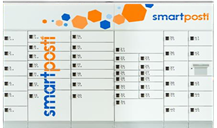
How to pick up a parcel from a SmartPosti parcel locker?
A simple and clear step-by-step guide for convenient parcel pickup through SmartPosti self-service terminals with Couriers for Less.
Receive the PIN code
Once your parcel is delivered to the parcel locker, SmartPosti will send you an SMS message with a door PIN code.
Go to the terminal
All SmartPosti parcel lockers are located indoors (in shopping centers), ensuring parcels are stored at an optimal temperature.
Enter the code
Select "Pick up parcel" on the locker screen and enter the door code received via SMS message.
Take your parcel
The door will open automatically. Take your parcel and make sure to close the door. The system will finish the process on its own.
Good to know about parcel storage
SmartPosti stores parcels in the terminal for 5 calendar days. Since all parcel lockers are located indoors, this is the safest choice when sending temperature-sensitive products or electronics. Using Couriers for Less, you can send your parcel simply and at an extremely competitive price.